KOAM Sky Watch Weather
- 4.4
- Rating
- 100.00K
- Installs
- Free
- Price

 Analysis by App-foxy
When I choose a weather app, I start with a practical question: what decision do I expect it to help me make? For checking whether I need a coat, planning a local walk, or deciding when to leave, a quick, familiar source can be more useful than a screen crowded with specialist tools. That is the role I see for KOAM Sky Watch. It is a free weather app from Evening Telegram Company, with an Everyone content rating, and it makes the most sense for people whose daily weather questions are local and straightforward.
I would weigh its connection to KOAM-TV against where I actually need forecasts. That local identity can be a welcome fit if the station’s area is part of my routine, but it is not a substitute for checking whether an app suits my destinations. The central trade-off is clear: I would choose it for convenient local awareness, not assume it is the ideal single tool for every trip or every kind of weather decision.
Start with the decisions you need to make
Before installing any weather app, I think about whether I mainly need a glanceable daily forecast or a detailed way to investigate changing conditions. KOAM Sky Watch is easier to recommend for the first job. If my day involves errands, commuting, or a short outdoor plan, I value a quick answer more than a collection of controls I may never use.
You May Also Like

 Blood Strike: 2.5 Anniversary
Blood Strike’s Loadouts Turn Every Drop Into a Tactical Gamble
A close look at Blood Strike’s custom loadouts: how fast access to signature weapons reshapes its battle royale rhythm, rewards preparation, and narrows the gap between fights.

 Pandora - Music & Podcasts
Pandora’s Music Is Easy to Start, but Harder to Recover
Pandora’s strength is its low-effort path from a seed to a station. Its weak spot is how much confidence it asks you to place in connection, setup, and quiet recovery.

 8 Ball Pool
 Is Built on Rivalries, Rematches, and Routine
A close look at the rivalries, rematches, shared routines, and unanswered safety questions that turn a quick pool match into a persistent mobile community.

 Samsung Music
’s Quiet Strength Is Playing What You Already Own
Its reach comes less from spectacle than from dependable access to a personal library. That simplicity is both the app’s strongest retention engine and its ceiling.

 AccuWeather: Weather Radar
AccuWeather Review: A Quick, Clear Forecast for Everyday Decisions
For everyday plans, the best forecast is the one you can understand quickly. AccuWeather makes rain timing, radar, and local conditions easy to act on, with a few trade-offs.

 Hill Climb Racing
Why Hill Climb Racing Still Turns Crashes Into One More Run
A tiny car, a bumpy hill and one more upgrade: Hill Climb Racing keeps resurfacing because its simple chaos makes every near-miss feel personal.
More From Our News Desk



The app has been available since August 12, 2010, and its current version is 6.1.701. It has over 100 thousand installs, a 4.4 average from around 1.1 thousand ratings, and 348 written reviews. Those figures suggest an established app with users who have taken time to rate and discuss it, but they do not tell me whether its local emphasis matches your needs. I would make that location fit the first thing to judge.
There is also a useful distinction between casual planning and high-stakes forecasting. For deciding what to wear, an everyday app can be enough. If the weather could affect a long drive, a demanding outdoor activity, or a safety decision, I would want to consult a source suited to that task as well. The right choice depends less on which app has the longest feature list and more on the cost of being wrong.
What using KOAM Sky Watch feels like
The app’s identity is closely tied to KOAM-TV, and that gives it a local-news feel rather than the detached character of a general-purpose weather utility. I approached it as the kind of app I would open in the morning, glance at before leaving home, and revisit when plans changed. That workflow suits its purpose well: it keeps the focus on getting weather information quickly instead of turning every check into a research session.
I would use it as a quick local reference rather than as a forecasting workspace. That distinction matters when comparing it with broad weather services: those can be a better fit for someone who checks several cities or wants to explore many types of weather information, while KOAM Sky Watch’s station connection gives it a more particular audience. I would not expect a local-first app to replace every tool in a traveler’s phone.
A practical morning routine
My preferred way to use an app like this is to make it part of an existing routine rather than constantly monitor it. I would check the current conditions before getting dressed, look ahead before leaving, and then return only if the day’s plans involved travel or time outside. That keeps the app useful without encouraging the habit of refreshing forecasts every few minutes.
A realistic example is a school run followed by an outdoor appointment. In the morning, I would use KOAM Sky Watch to decide whether a light jacket is enough. Before heading to the appointment, I would check again because the practical question has changed: not “What is the weather today?” but “Will the conditions make this next trip uncomfortable?” This two-step workflow is more useful than memorizing a forecast, because it connects the information to decisions I actually need to make.
Another good use is planning a short local errand. If I am walking to a shop, taking a dog outside, or waiting for transport, I do not necessarily need a dense map full of layers. I need a quick answer about whether the next part of the day looks manageable. KOAM Sky Watch is best judged on that kind of ordinary decision, where speed and clarity matter more than an exhaustive collection of controls.
Where the app earns its place
The first strength I noticed is focus. A local television weather app has a more immediate purpose than many broad weather platforms: it is designed around the weather information associated with its station audience. That can feel more relevant than opening a global service and sorting through features that have little connection to a normal day in one area.
Its free price also lowers the risk of trying it. I can install a weather app without planning around a subscription or deciding whether a premium tier is worth keeping. That matters because weather information is often a utility rather than a hobby. For many people, the best app is the one they can open quickly and understand immediately, not the one with the largest feature list.
I also appreciate that the app is rated for Everyone. That makes it easier to recommend for a shared household, including someone who wants a simple weather reference without encountering an age-oriented presentation. The rating does not guarantee that every screen will suit every person, but it does fit the app’s practical role as a general daily tool.
There is a subtle advantage to using a station-connected weather app when local conditions are the priority. A forecast can be technically detailed yet still feel unhelpful if it is presented without local context. KOAM Sky Watch’s identity encourages me to think in terms of the area served by KOAM-TV, which is more useful for a resident than a generic forecast page that treats every place as interchangeable.
Three ways I would use it more intelligently
First, I would treat the app as a decision aid, not as a promise. Forecasts are most helpful when they guide choices such as when to leave, what to wear, or whether to reschedule an outdoor task. I would avoid interpreting a single glance as certainty, especially when the day involves safety-sensitive travel or a long period outdoors.
Second, I would check the forecast at the point of decision rather than only the night before. A plan made in the evening can become less useful by morning, and a morning forecast can still be too early for a late-day activity. The practical insight here is that the app works best as a repeated checkpoint: one look for preparation, another before the activity itself.
Third, I would keep a second source available for situations that go beyond local daily planning. KOAM Sky Watch can be the convenient first check, while a more specialized weather service may be better when I need detailed storm tracking, extensive map layers, or information for a destination outside the app’s natural local focus. Using it as the first layer rather than forcing it to be the only layer is a sensible compromise.
One small workflow choice helps keep that second-source approach useful: decide in advance what would make you cross-check. For me, it would be a long journey, a plan where conditions could create a safety concern, or a destination well beyond my usual area. That way, I am not opening several apps for every ordinary errand, but I also do not mistake convenience for enough detail in a situation that deserves closer attention.
The important limitation: simplicity can become a boundary
My main reservation is that a local, straightforward weather app may not satisfy users who want to investigate weather in depth. If your choices depend on detailed conditions across several regions, you may prefer a larger weather platform with stronger travel tools and broader location handling. Likewise, outdoor professionals, serious hikers, and people who follow storms closely may want more specialized presentation than a station-centered app is intended to provide.
This is not a criticism of the app’s basic purpose; it is a question of fit. I would not choose KOAM Sky Watch as my only weather resource for a long road trip through unfamiliar areas. I would also hesitate to rely on it alone for activities where wind, visibility, or rapidly changing conditions require a more technical view. In those cases, a dedicated forecasting service or official local alerts should take priority.
There is another trade-off in the television-station connection. It can make the app feel relevant when I live within the station’s natural audience, but less compelling when my daily life is elsewhere. A local weather app is not automatically the best choice simply because it is well made; the value depends on whether its coverage and perspective match the places I care about. Someone who moves frequently or checks weather for several distant cities may find a national or global alternative more convenient.
I would also keep expectations realistic about the meaning of a current version number. Version 6.1.701 shows that the app has an active version identity, but it does not by itself tell me how every phone model will behave or how frequently each kind of information changes. I would install it, check that my location needs are met, and then decide whether it deserves a permanent place on my home screen.
What to check before making it your default
The first question I would answer after installation is whether the places I care about are represented in a way that is useful for my routine. A station-centered identity is a reason to try the app when local weather is the priority, not a guarantee that it will suit every address or destination. I would test it against the places I actually visit before relying on it as my only reference.
I would also think about how I prefer to receive weather information. If I want to open an app when a question comes up, a simple routine may be enough. If I expect alerts, highly tailored displays, or technical detail, I should compare those needs with what the app offers in practice rather than assume they are included. This is a sensible check for any weather app, but especially for one I am considering because of its local focus.
Switching does not need to be an all-or-nothing choice. I can keep a familiar general-purpose service while trying KOAM Sky Watch for local checks, then see which one I naturally reach for. If I do not find its local perspective useful, I can remove it without having to rebuild a complicated setup. If it becomes my easiest source for everyday decisions, I can keep the more specialized option for journeys and unusual conditions.
Who should install it?
KOAM Sky Watch is a good match for a person who wants a free weather app connected to a familiar local news source. It makes particular sense if your weather questions are ordinary and location-focused: whether to take a coat, whether a walk looks comfortable, or whether an outdoor plan needs a backup. The app’s Everyone rating also makes it a reasonable household choice when different family members need the same basic reference.
I would recommend it to users who dislike clutter. Some weather apps make the first screen feel like a dashboard for aviation, climate research, and market-style data. That can be useful, but it can also slow down a simple check. KOAM Sky Watch is better suited to someone who values an approachable local experience over a long list of adjustable displays.
I would skip it, or at least pair it with another service, if my main needs were international travel, multi-city planning, highly detailed radar interpretation, or specialized outdoor forecasting. The same applies if I prefer to build a personal weather setup around custom alerts and technical data. In those situations, a more advanced alternative would likely save time even if it felt less friendly.
A useful middle ground is to use KOAM Sky Watch for local everyday awareness and another trusted source when the consequences of a forecast are higher. That approach respects the app’s strengths without asking it to replace every possible weather tool. It also avoids a common mistake: choosing one app for convenience and then expecting it to cover needs it was never designed to handle.
My final assessment
After using KOAM Sky Watch as a practical weather check, I see it as a focused utility rather than an all-purpose forecasting command center. Its free access, local-news identity, long presence on mobile, and approachable purpose make it easy to recommend to the right person. I especially like it for short, repeated decisions where I want useful weather context without spending time navigating an elaborate system.
The honest trade-off is that its appeal depends on staying within that lane. Users who need deep weather analysis or forecasts across many regions should look toward a broader or more specialized alternative. For everyone else, especially people connected to the KOAM-TV viewing area, it is a sensible app to try before reaching for something more complicated.
My recommendation is simple: choose KOAM Sky Watch if you want a free, local-minded weather companion for everyday planning. Keep another source in reserve for travel, severe conditions, or technical forecasting needs, and the app’s strengths become much clearer. It does not need to do everything to be useful; it just needs to make the next weather-related decision easier.
FAQs for KOAM Sky Watch Weather
01What features does KOAM Sky Watch Weather offer?
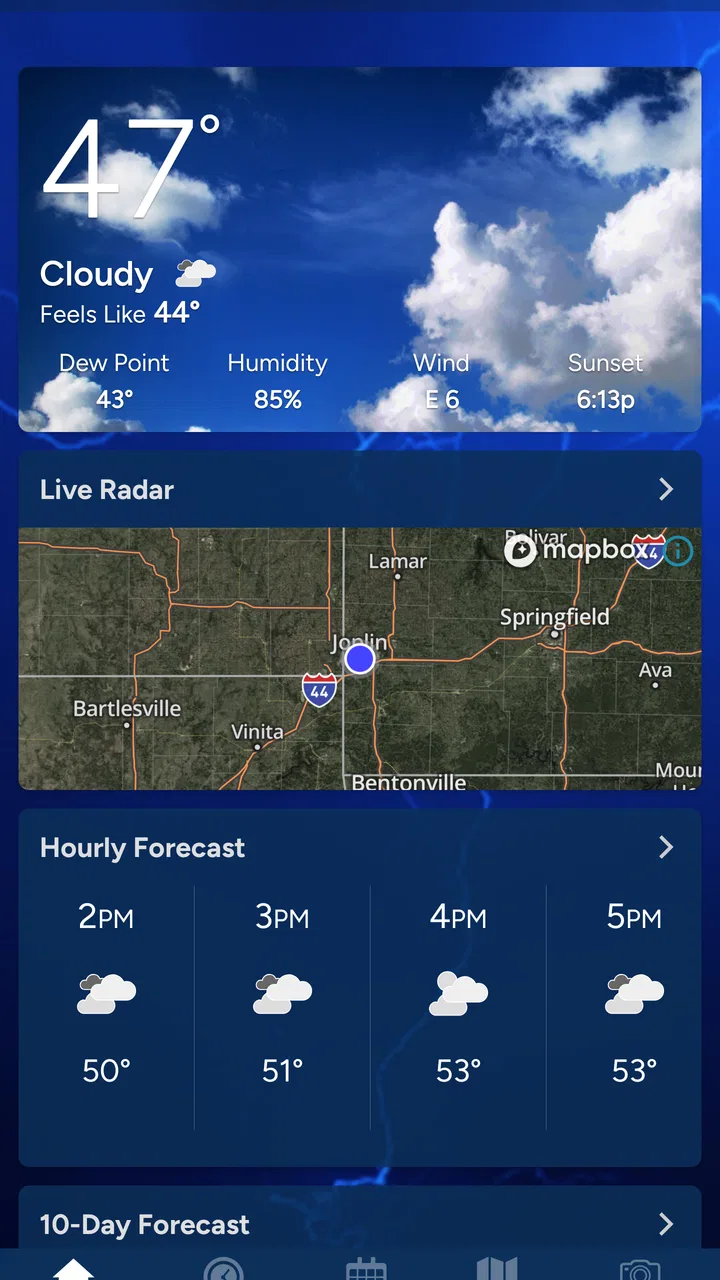
KOAM Sky Watch Weather provides comprehensive weather updates, including real-time radar, hourly forecasts, and severe weather alerts. Users can customize notifications for specific weather conditions and access detailed maps that track storm paths. The app also includes video updates and weather news from local meteorologists.
02Is KOAM Sky Watch Weather available for both Android and iOS devices?
Yes, KOAM Sky Watch Weather is available for both Android and iOS devices. You can download it from the Google Play Store for Android devices and the Apple App Store for iOS devices. The app is designed to provide a seamless experience across different platforms, ensuring you stay informed wherever you are.
03Does KOAM Sky Watch Weather require a subscription for its services?
KOAM Sky Watch Weather offers both free and premium services. The free version includes basic weather updates and alerts, while the premium subscription provides enhanced features such as ad-free usage, detailed radar animations, and extended forecasts. Users can choose the option that best suits their needs.
04How accurate are the weather forecasts provided by KOAM Sky Watch Weather?
KOAM Sky Watch Weather is known for its accuracy, leveraging advanced meteorological data and algorithms to provide reliable forecasts. The app sources information from trusted local weather stations and expert meteorologists, ensuring users receive timely and precise weather updates for their specific location.
05Can KOAM Sky Watch Weather send notifications for severe weather alerts?
Yes, KOAM Sky Watch Weather can send push notifications for severe weather alerts. Users can customize these alerts to receive warnings about specific conditions such as thunderstorms, tornadoes, or flooding. This feature helps users stay prepared and take necessary precautions during adverse weather events.
Pros
- Accurate weather updates in real-time.
- User-friendly interface with intuitive design.
- Customizable alerts for severe weather.
- Detailed radar and satellite imagery.
- Low data consumption for smooth operation.
Cons
- Limited international location coverage.
- Ads can be intrusive at times.
- Occasional app crashes reported.
- Requires frequent updates for accuracy.
- Some features are locked behind paywall.

KOAM Sky Watch Weather
Gallery